Home Skylinked Skylitee Sky Gallery Sky Essentials Orangesky Agency Solutions Contact us

Shopify sales widgets

Essential tools for a better Shopify buying journey.

Add urgency, highlight offers, simplify buying and improve your product pages with 12 practical sales widgets in one Shopify app.

No coding required. Manage placement and styling through Shopify app blocks and app embeds.

12Sales widgets
OneDashboard
NoCoding

01 The problem

Your Shopify store does not need more clutter. It needs a clearer buying journey.

Customers may miss your offers, lose sight of the Add to Cart button or leave with unanswered questions.

Sky Essentials helps you place useful buying information and actions where customers can easily find them.

Where shoppers drop off

  • They miss the offer you are running
  • They lose sight of the Add to Cart button
  • They leave with a question nobody answered
  • They never see the product that goes with it
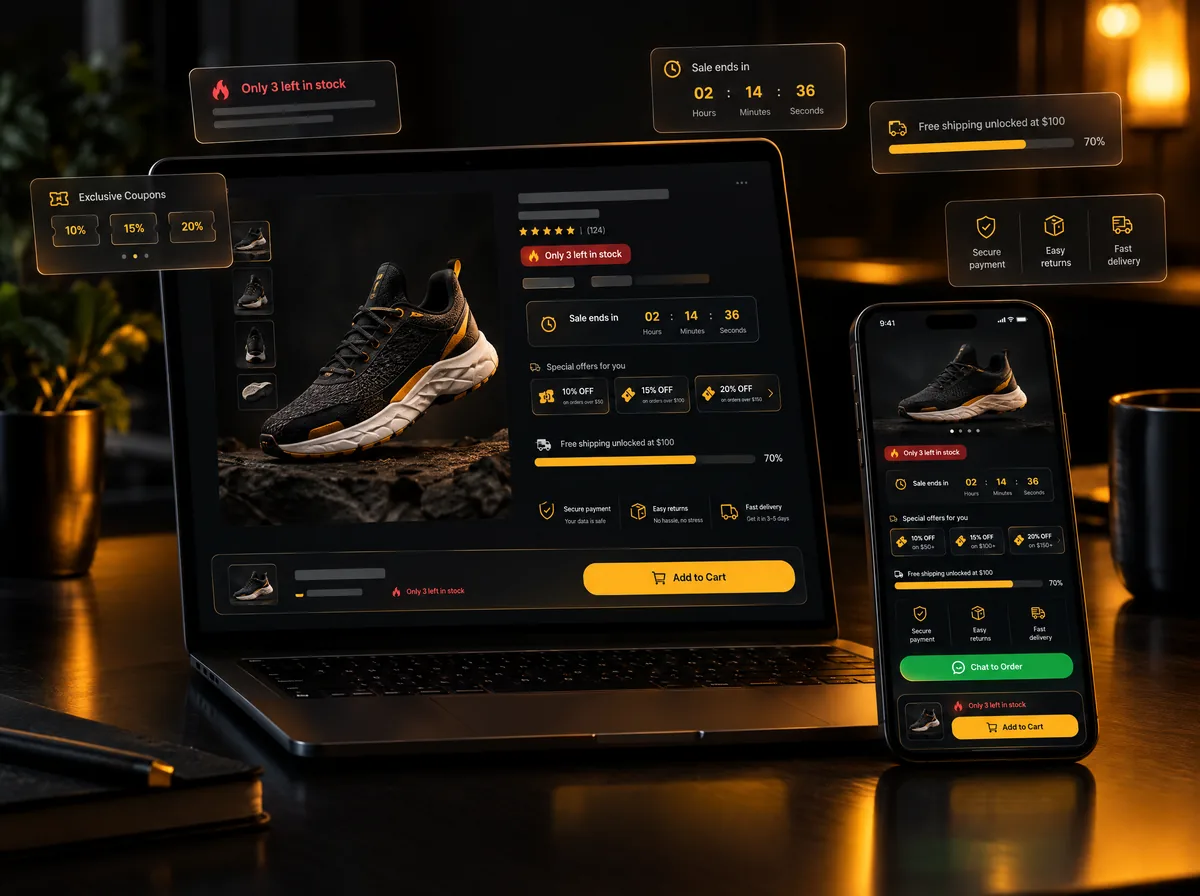
12 sales widgets Shopify product page on a laptop and phone with a sticky Add to Cart bar, low-stock label, countdown timer, coupon cards and a free-shipping progress bar

Feature overview

Everything your Shopify product pages need.

Twelve widgets, grouped by the job they do on the page. Turn on the ones your storefront needs and leave the rest off.

01

Keep buying actions visible

3 widgets
01

Sticky Add to Cart

Keep the Add to Cart button visible while shoppers scroll. Choose a full-width or floating layout, display product variants and open the cart drawer or redirect customers to the cart.

02

WhatsApp Ordering

Let customers ask questions or order directly through WhatsApp. Add a product-page button or a global sticky button with a pre-filled message containing the product name and link.

03

Menu Item Highlight

Draw attention to important menu items such as Sale, New Arrivals or Offers. Add colors, gradients, animations and badges such as “HOT” or “SALE”.

02

Communicate urgency

3 widgets
04

Stock Urgency

Show a low-stock message when actual inventory falls below your selected limit. Customize the quantity threshold and the urgency message.

05

Sale Countdown Timer

Add a countdown timer for limited-time promotions, launches and seasonal sales to communicate when an offer ends.

06

Order Activity Counter

Display a customizable activity counter on product pages. Control the number range, message, colors, layout and attention-grabbing animation.

03

Make offers easier to understand

2 widgets
07

Available Offers

Present discounts, coupon codes and special offers clearly on product pages. Choose from banners, lists, coupon cards, grid layouts or an automatic slider.

08

Offer Progress Bar

Show customers how close they are to unlocking a discount, free shipping, a coupon or another reward.

04

Build confidence and increase discovery

4 widgets
09

Product Page Icons

Display trust signals and product benefits with customizable icons — secure payments, quality guarantees, easy returns and more.

10

Shipping Indicator

Keep shipping and delivery information visible on product pages, so customers understand the details before adding to cart.

11

Product Videos

Add demonstrations, customer videos or usage content to product pages so shoppers understand products more easily.

12

Product Upsell

Recommend relevant or complementary products on product pages to help customers discover more and raise cart value.

Why Sky Essentials?

The practical Shopify widgets you need, managed in one place.

  • Reduce the need for separate single-feature apps
  • Customize text, colors, layouts and animations
  • Preview changes before publishing
  • Control placement through the Shopify theme editor
  • Add widgets using app blocks and app embeds
  • Improve the buying journey without editing theme code

How it works

Set up your widgets in three simple steps.

01

Install Sky Essentials

Add the app to your Shopify store and open the Sky Essentials dashboard.

02

Choose your widgets

Enable the features you need, then add their app blocks or app embeds through your Shopify theme editor.

03

Match your storefront

Customize the text, colors, layout and placement, then preview and publish your changes.

FAQs

Frequently asked questions.

Something else on your mind? Write to contact@orangesky.app and we will answer it.

Do I need to edit my Shopify theme code?

No. Sky Essentials uses Shopify app blocks and app embeds, allowing you to manage supported widgets through the theme editor.

Can I customize the widgets?

Yes. Available customization options include text, colors, layouts, button styles, animations and placement, depending on the widget.

Does Sky Essentials create discount codes?

Sky Essentials can display offers, coupon codes and reward milestones. Your underlying discounts should be configured correctly in Shopify.

Can customers order using WhatsApp?

Yes. You can add a WhatsApp button to product pages or use a global sticky button with a customizable pre-filled message.

Can I choose which features to activate?

Yes. You can enable only the widgets that are relevant to your storefront.

Install Sky Essentials

Give shoppers a clearer reason to take the next step.

Keep buying actions visible, communicate important offers and improve your product pages with Sky Essentials.12 practical Shopify widgets. One simple app. No coding required.